
Summarize this blog post with:
For decades, building a real-time AI application meant managing two fundamentally incompatible systems. The analytics and machine learning infrastructure lived on one side — in a data lake or warehouse built for throughput. The operational database lived on the other — a standalone PostgreSQL instance capturing what users were actually doing right now. Between them sat a brittle pipeline: change data capture jobs, ETL syncs, and replication logic that broke on a schedule and introduced latency measured in minutes, not milliseconds.
The business cost of that architectural fragmentation is well-documented. Organizations suffer an average of $12.9 million annually in losses directly attributable to poor data quality — a figure that compounds when real-time AI systems are forced to operate on stale, pipeline-delayed data.
Yet, through 2026, organizations will abandon 60% of AI projects that are unsupported by AI-ready data. The bottleneck isn't compute, and it isn't model quality. It's the distance between transactional data and the AI systems trying to reason about it.
Databricks Lakebase is the architectural answer to that gap. Operational databases are a $100-billion-plus market that underpin every application. But they are based on decades-old architecture designed for slowly changing apps, making them difficult to manage, expensive, and prone to vendor lock-in. AI is introducing a new set of requirements: every data application, agent, recommendation, and automated workflow now needs fast, reliable data at the speed and scale of AI agents.
Since its launch in June 2025, adoption has grown at more than twice the rate of Databricks' data warehousing product, with thousands of companies running production workloads directly on their operational data.
The conventional approach to building data applications forced a heavy engineering trade-off. You had to balance the informational use case — historical context, ML feature generation, analytical queries — against the transactional use case — capturing what a user clicked three seconds ago, updating inventory in real time, persisting agent state mid-workflow.
Handling both meant operating separate databases wired together with fragile pipelines. The scale of that problem is significant: data teams report an average of 67 pipeline incidents per month, and 68% of teams require four or more hours just to detect a failure when it occurs. Data engineers became pipeline firefighters. ML models queried data that was already stale by the time it arrived. Real-time AI applications became a contradiction in terms.
Lakebase on the Databricks database platform isn't just "Postgres on Databricks." It's a shift in how we think about operational and analytical data living together — governed, queryable, and powered by the same platform.
Instead of standing up a separate database, building reverse ETL jobs, and managing authentication in two places, teams can now sync governed Lakehouse tables into Postgres with millisecond query times, build application state and transactional tables directly in Databricks Lakebase, and secure everything using Databricks identities and Postgres roles.
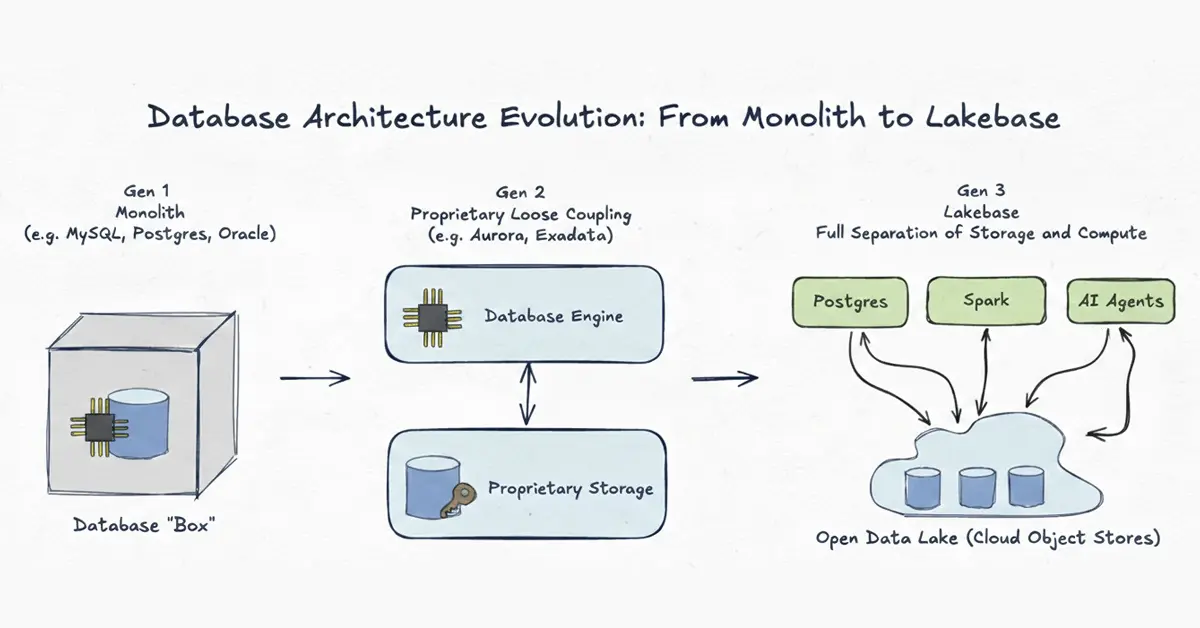 Source: Databricks
How database architecture has evolved across three generations — from monolithic on-premises systems to fully decoupled, open Lakebase architecture. The separation of compute and storage is the core breakthrough that makes real-time AI applications viable without fragile pipelines.
Databricks Lakebase simplifies application development with a proven OLTP database, without the headaches of database management. It eliminates complex, custom ETL pipelines and ensures transactional data is integrated into analytics and Databricks AI-native applications. Teams can avoid development delays by using familiar, open-source Postgres with existing libraries, frameworks, and SQL — with decoupled compute and storage for independent scaling, point-in-time recovery, and the ability to version a database like code.
The Databricks Lakebase architecture combines the reliability and familiarity of Postgres with modern database capabilities including autoscaling, scale-to-zero, branching, and instant restore. These features enable flexible development workflows, cost-efficient operations, and rapid iteration. The platform integrates with real-time feature serving for ML models and Feature Store, agent state for AI agents, and transactional data for Databricks Apps or any application connected to it.
Data moves in two directions between the Lakehouse and Lakebase:
- Synced Tables replicate Lakehouse data into Databricks Lakebase so applications can query at low latency
- Lakehouse Sync moves operational data from Lakebase back into the Lakehouse for analytics and downstream ML
Both directions. Zero custom pipelines!
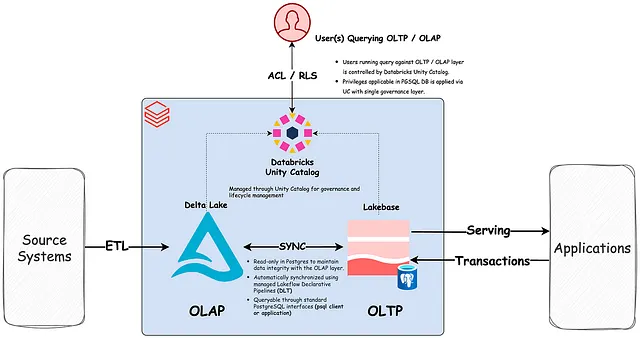 Source: Databricks
The Databricks Lakebase architecture: transactional compute (Postgres) runs independently on top of open-format storage in the lake, unifying OLTP and OLAP workloads on a single governed foundation — without ETL pipelines between them.
The Lakebase Databricks platform delivers a production-grade set of capabilities:
| Feature |
What It Does |
Why It Matters |
| Serverless Autoscaling & Scale-to-Zero |
Compute adjusts dynamically to traffic; shuts off when idle |
Eliminates wasted spend on idle infrastructure |
| Instant Database Branching |
Creates zero-copy clones of production data in seconds |
Risk-free testing without duplicating full datasets |
| Point-in-Time Recovery (PITR) |
Restores database to any millisecond within the retention window |
Protection against accidental deletions and application bugs |
| Unity Catalog Governance |
Single security model across operational and analytical data |
One access control policy for the entire data estate |
| Sync Tables |
Keeps Lakehouse and Lakebase data aligned automatically |
No fragile pipelines; no manual sync jobs |
| Postgres 17 Support + pgvector |
Full Postgres compatibility including AI-native vector search |
Use existing tooling; enable semantic and similarity search natively |
The branching capability deserves particular attention. Like Git for your database, branches let teams create isolated environments from production data in seconds — test schema changes, validate new application logic, run load tests — without touching live workloads or paying for full data duplication.
Getting a production-ready application running on the Lakebase Databricks platform follows a structured path. The Microsoft Azure Databricks Lakebase documentation and the Databricks blog on building production-ready apps both outline this in detail.
The key phases are:
- Provision and enable. Enable Databricks Lakebase from your workspace. Create a Lakebase Autoscaling project — the top-level container for database resources, branches, computes, and roles. For Azure Databricks Lakebase users, the Azure documentation provides region-specific provisioning steps.
- Define your schema. Use standard SQL or the psql-compatible query editor directly within the Databricks database platform UI. No new tooling is required; the environment is familiar to any Postgres developer.
- Design your data flows. Determine which Lakehouse tables should be synced into Databricks Lakebase for low-latency application reads, and which Lakebase tables need Lakehouse Sync for analytical downstream use. This architectural decision is where most implementation effort is concentrated.
- Connect your application backend. Route application read/write operations to Databricks Lakebase via standard Postgres drivers. For Databricks Apps, a native Lakebase resource integration simplifies authentication and connection management significantly. The Databricks blog on using Lakebase as a transactional data layer provides detailed patterns for this step.
- Apply governance through Unity Catalog. Register Databricks Lakebase as a catalog in Unity Catalog. Access control, auditing, and compliance policies defined once apply uniformly across both operational and analytical data.
- Configure autoscaling and branching. Set scale-to-zero thresholds for idle periods. Create a development branch from production data for ongoing testing and iteration.
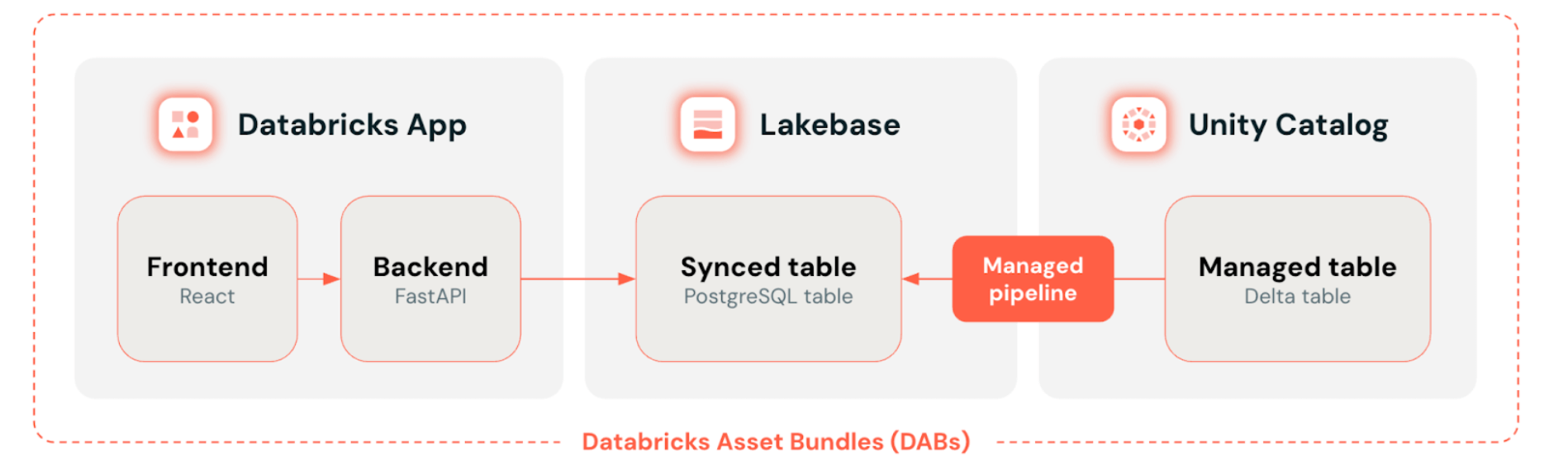 Source: Databricks
How a production-ready data application is assembled on the Lakebase Databricks platform: Databricks Apps at the front end, Databricks Lakebase as the transactional data layer, Unity Catalog managing governed Delta tables with automatic sync — all deployed as code via Databricks Asset Bundles.
The use cases of Lakebase database span industries and architectural patterns. The Databricks Lakebase identifies the following primary workload types:
| Industry |
Use Case of Lakebase Database |
What It Replaces |
| Retail & E-commerce |
Personalized recommendations and real-time offer targeting |
Standalone recommendation engines fed by delayed batch pipelines |
| Healthcare |
Clinical trial data management alongside predictive diagnostic models |
Siloed OLTP databases disconnected from analytical ML layers |
| Financial Services |
Automated trading and streaming fraud detection analytics |
Separate operational databases with CDC pipelines to analytics |
| Manufacturing |
Machine telemetry ingestion and predictive maintenance workflows |
On-premises historian systems with manual data export jobs |
| Media & Entertainment |
Real-time content personalization and audience engagement tracking |
Fragmented event tracking with delayed warehouse sync |
Databricks Lakebase is built for a specific problem. It is not a universal replacement for every operational database. Here is a clear framework for evaluating fit:
Use Databricks Lakebase when:
- Your application needs to write transactional data and immediately query analytical context from the same data — real-time personalization, AI agent workflows, feature stores, live operational dashboards
- You want to eliminate the engineering overhead of maintaining a separate OLTP database alongside a Lakehouse
- Governance, auditability, and compliance need to span both operational and analytical data without dual configuration
Azure Databricks Lakebase users should note the platform's current regional availability for Autoscaling — which covers major AWS and Azure regions — before scoping latency-sensitive global deployments. The Azure documentation outlines supported regions and configuration specifics.
Databricks Lakebase supports sub-10ms latency for high-throughput workloads, which covers the vast majority of enterprise AI application requirements. The combination of Databricks Lakebase with the OLTP database allows solving architectural problems in a fundamentally different way, with a clear path away from fragile ETL pipelines and the forced separation of analytical and operational layers.
Databricks Lakebase is now Generally Available on AWS and in beta on Azure, with a growing ecosystem of launch partners who have validated it for database modernization, real-time application development, and agentic AI workflows. Databricks Lakebase launch partners are ready to help customers capitalize on this shift, having validated the Lakebase Databricks platform for database modernization, building real-time applications, and deploying agentic AI workflows.
Polestar Analytics is among those launch partners. As a Databricks AI-native implementation specialist in data engineering, AI applications, and Databricks Lakebase architecture. Polestar Analytics brings the implementation methodology — architecture design, data flow mapping, governance configuration, and application integration — that transforms a technically capable platform into a production system that performs reliably and scales predictably. The Databricks database platform eliminates the architectural bottleneck. A proven implementation partner eliminates the deployment risk.
Databricks Lakebase Integration Map: Where Lakebase Sits in the Full Platform
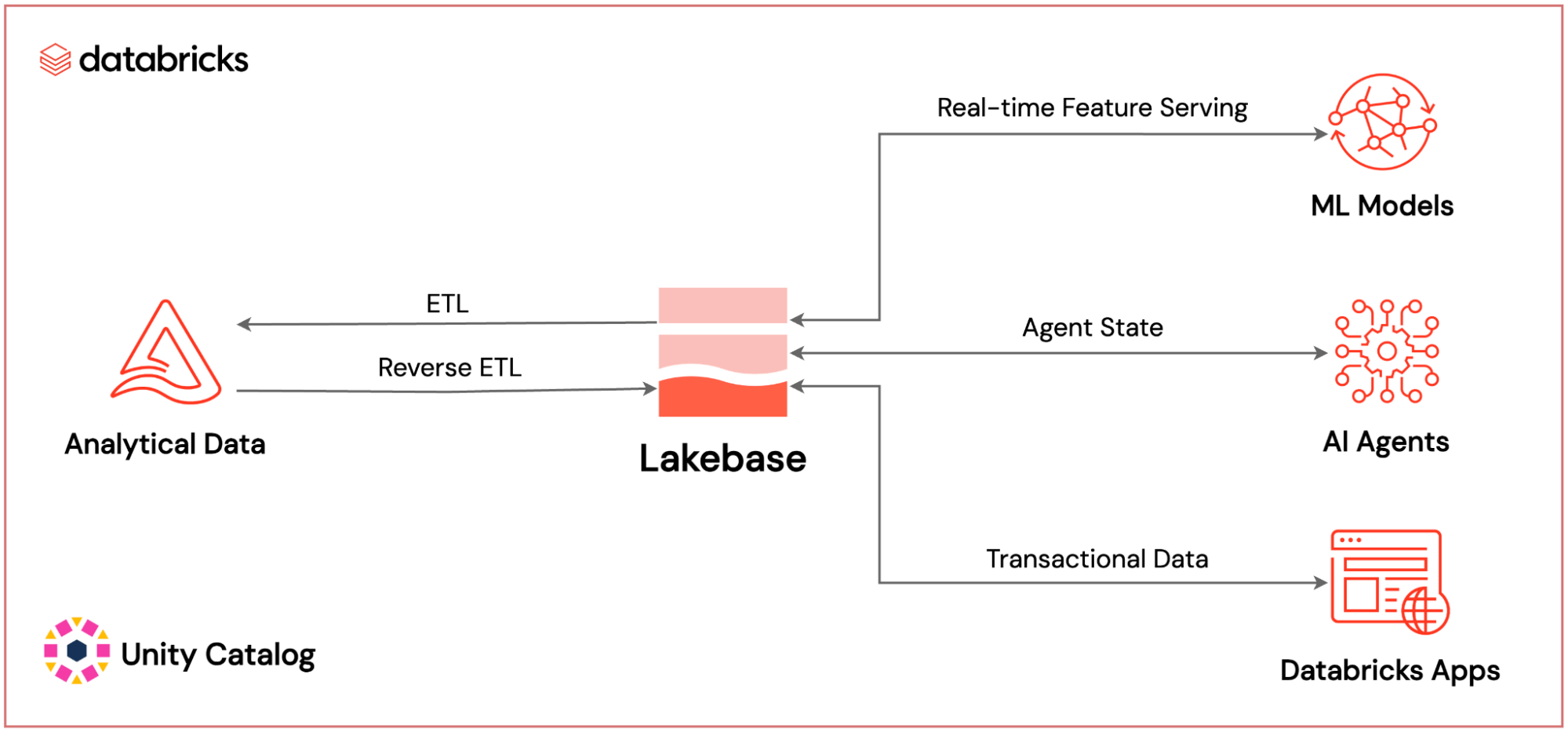 Source: Databricks
Where Databricks Lakebase sits within the full Databricks AI-native platform: powering real-time ML feature serving, AI agent state persistence, and application transactional data — all governed by Unity Catalog.
Build Your Real-Time AI Application on Databricks Lakebase From Databricks Lakebase architecture design to production deployment — Polestar Analytics guides every phase of your implementation.
Talk to Our Engineering Team
Lakebase manages bidirectional data movement through two dedicated mechanisms, Synced Tables and Lakehouse Sync, both operating without custom pipelines. Consistency is maintained at the platform level, eliminating the manual ETL jobs that traditionally drift, fail silently, or introduce latency.
No, Lakebase is Postgres 17-compatible, so existing drivers, ORMs, SQL queries, and libraries continue to work without modification. The shift is in where Postgres runs and what it connects to, not in how developers interact with it day-to-day.
Yes, teams use it today for operational dashboards, real-time personalization, and transactional apps that simply need clean, governed data without pipeline overhead. The AI capabilities are there when you're ready, but they're not a prerequisite for getting value on day one.